Systems Diagramming
- Write a systems diagram for a simple architecture
- Identify key components and their interactions in a systems diagram
- Justify design decisions in a systems diagram based on technical reasoning
Prework
N/A
Workshop
Introduction
Ask trainees: "What do you think a systems diagram is for?"
Explain that a systems diagram is a visual representation of how different components of a system interact with each other. It helps engineers and stakeholders understand the architecture, identify potential bottlenecks, and communicate ideas effectively.
Highlight that systems diagrams are used in planning, troubleshooting, and presenting solutions.
Split trainees into pairs or small groups.
Ask the trainees to think of a system they are familiar with (e.g. a restaurant, an airport, a music venue).
Tell them to diagram in 6 minutes how the system works for a specific user type (e.g. a customer, a traveller, an attendee)
Bring the trainees back and share diagrams
Try to guess the system.
Introduce the key parts of a systems diagram:
- Components: Represented as boxes or icons, these are the individual parts of the system (e.g., servers, databases, APIs).
- Connections: Arrows or lines that show how components interact or communicate.
- Labels: Text that describes the components and connections.
- Boundaries: Dashed or solid lines that group related components (e.g., a VPC or Security Group).
Explain that systems diagrams can vary in complexity, from simple block diagrams to detailed architecture diagrams.
Task the trainees with thinking of all of the components of an AWS systems architecture diagram.
- EC2
- S3
- RDS
- Scaling Groups
- VPC
- IAM
- Security Groups
- Load Balancers etc
Task the trainees to also think about the complexity behind each component
- EC2: Instance types, AMIs, EBS volumes
- S3: Buckets, policies, lifecycle rules
- RDS: Instance types, read replicas, backups
- Scaling Groups: Policies, health checks
- VPC: Subnets, route tables, NAT gateways
- IAM: Roles, policies, permissions
- Security Groups: Inbound/outbound rules
- Load Balancers: Target groups, listeners, health checks
Explain that the complexity of each component can be represented in the diagram, but it is not always necessary to include every detail.
Introduce the concept of abstraction in systems diagrams. Abstraction allows you to simplify complex systems by focusing on the most important components and their interactions.
Highlight the part of the above areas that should be on a systems diagram. (Highlighted in italics above).
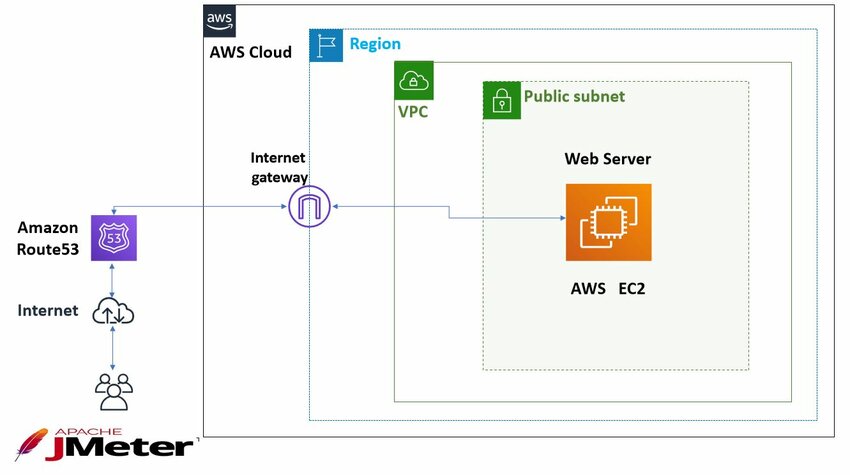
Share an example of a simple AWS diagram:
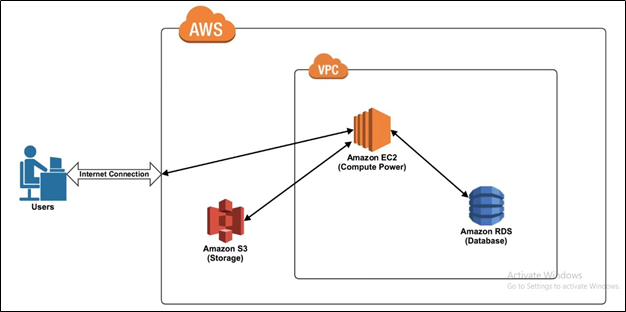
Share an example of a slightly more complex AWS diagram:
Scare the trainees by showing them a very complex diagram:
Give the trainees 10 minutes to create a systems diagram of a restaurant's payment system.
- Components: Point of Sale (POS) system, payment processor, databases, servers
- Connections: Arrows showing data flow between components (e.g., user input to POS, POS to payment processor)
- Labels: Descriptions of components and connections (e.g., "User Input", "Payment Processing")
- Boundaries: Group related components (e.g., "Payment System" boundary around POS and payment processor)
Remind them to consider horizontal and vertical scaling in their decisions.
Share the diagrams with each other on excalidraw. Highlight the differences in the diagrams.
Ask trainees to explain their design choices:
- Why did they place components in certain locations?
- Why did they group certain components together?
- How does their design ensure security and scalability?
- What are the technical reasons for choosing this architecture? (e.g., performance, cost, security, reliability)
Encourage peer feedback and discussion to refine the diagrams, focus on how the process is often iterative and collaborative. It's very very unlikely that an architecture diagram will be the same at the start as it is at the end of a project.
Wrap-Up
Recap the key points:
- Systems diagrams are essential for planning and communication.
- The key parts of a diagram are components, connections, labels, and boundaries.
- Justifying design decisions helps ensure the diagram meets the system's requirements.
- Technical reasoning is crucial for effective architecture.
Encourage trainees to practice creating diagrams for more complex systems as they progress through the course.